
Seoul travel OCR guide
Learn how to capture Korean text or addresses from your phone, crop the image, and use Seoul Travel OCR to find the location on Google Maps or Naver Map.
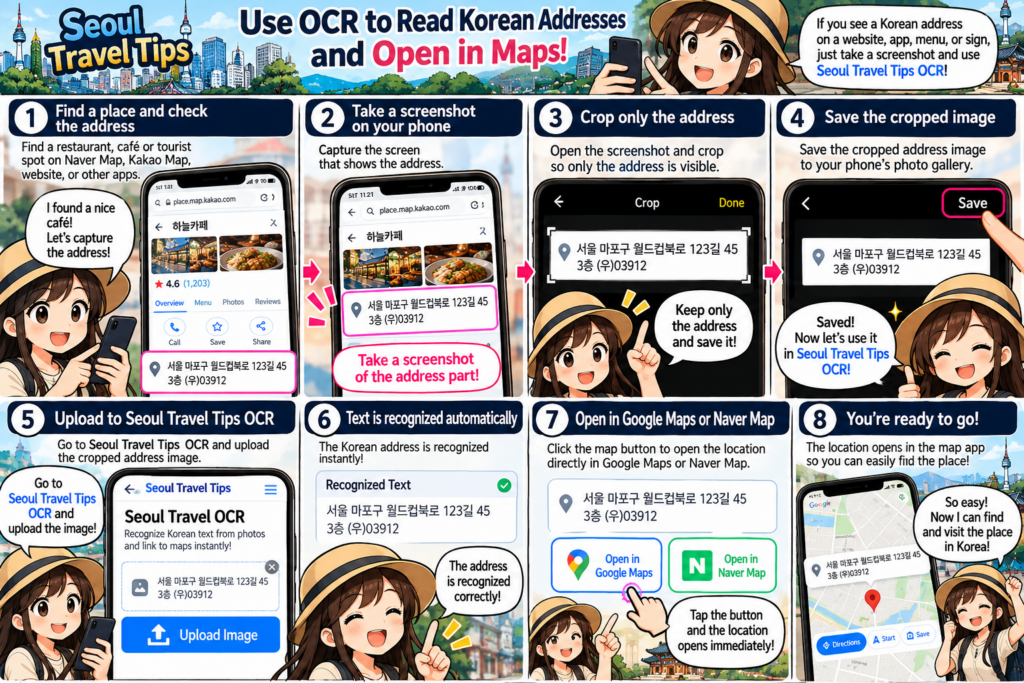
Use Case 1 – “Getting to Your Destination”
Use Seoul Travel OCR to find your way to places you want to visit, such as restaurants, museums, pop-up stores, and other destinations.
Step 1 – Capture the Address
Find the place you want to visit and take a screenshot of its address on your phone.
Zoom in on the address before taking the screenshot, and make sure to capture only the address without any unnecessary text.
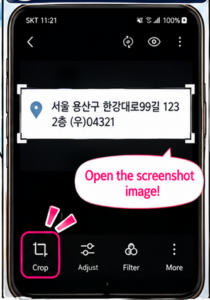
Step 2 – Turn On Your GPS
When you’re ready to start your journey, make sure your phone’s GPS is turned on.
Step 3 – Open Seoul Travel OCR
As shown in the image below, tap “Seoul Travel OCR Guide” to open the tool.
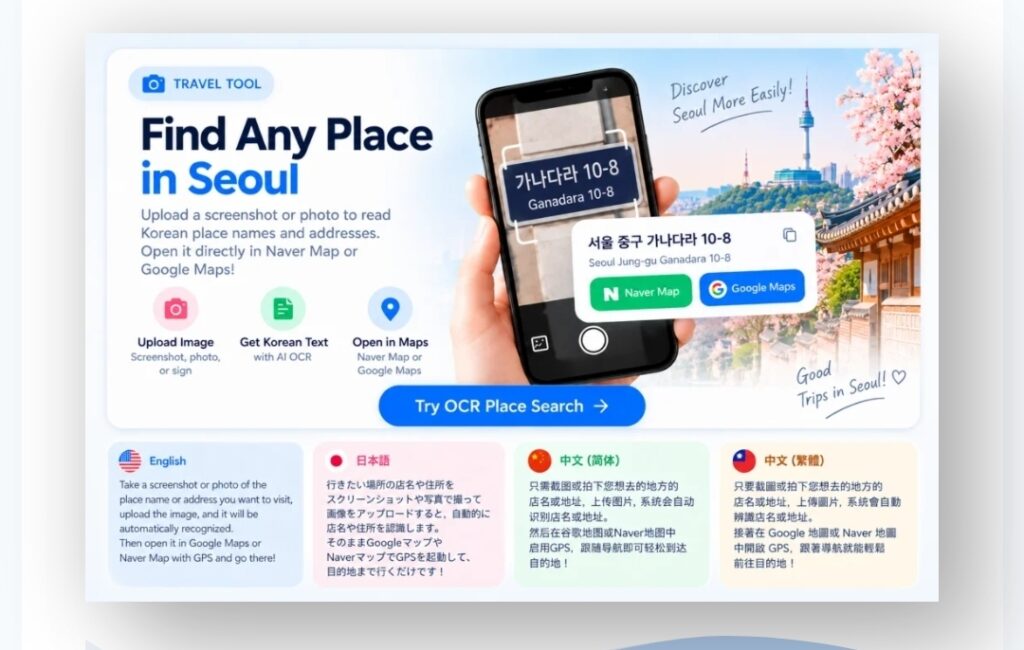
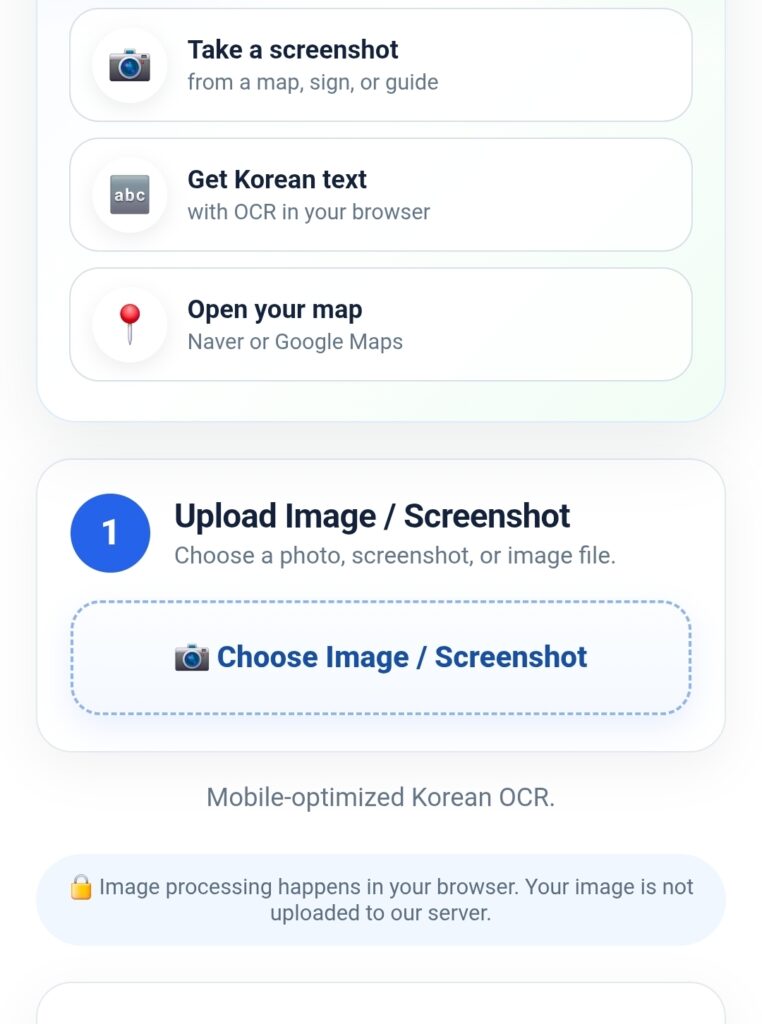
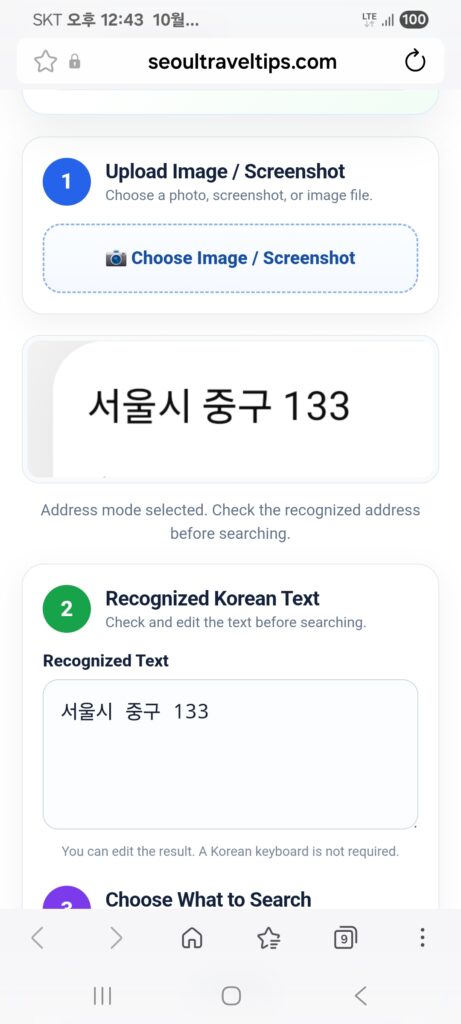
Step 4 – Upload the Address Image
As shown in the image below, tap the “1. Upload Image” box and upload the screenshot of the address you captured.
Step 5 – Open the Map
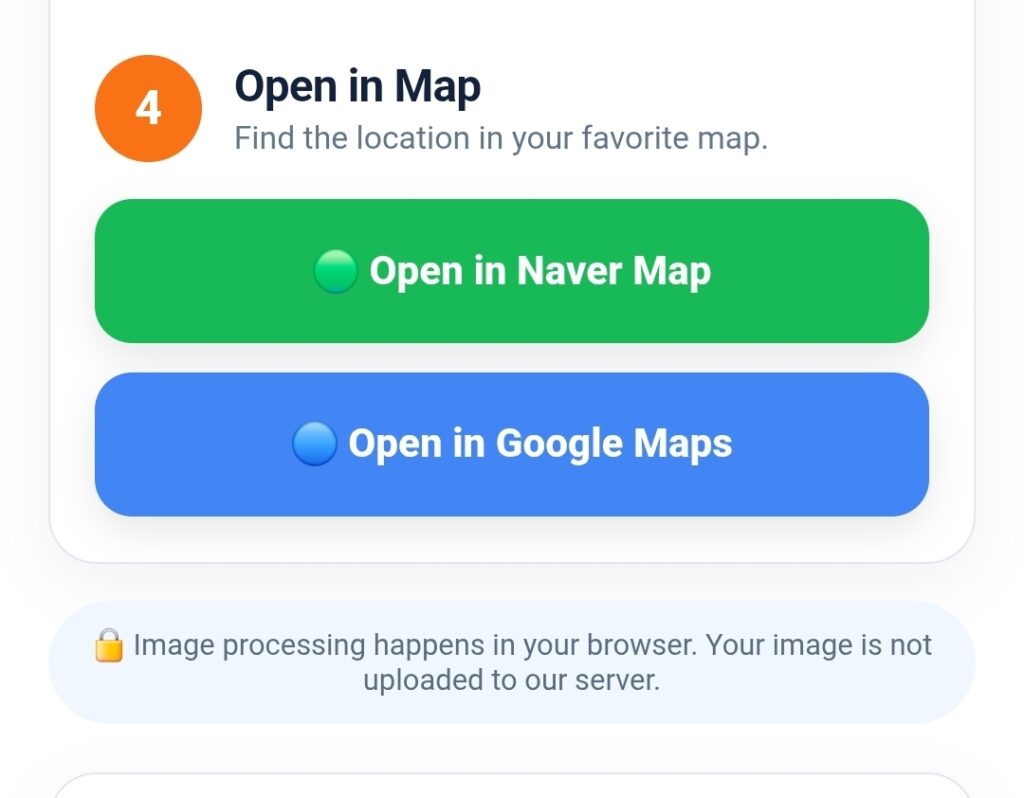
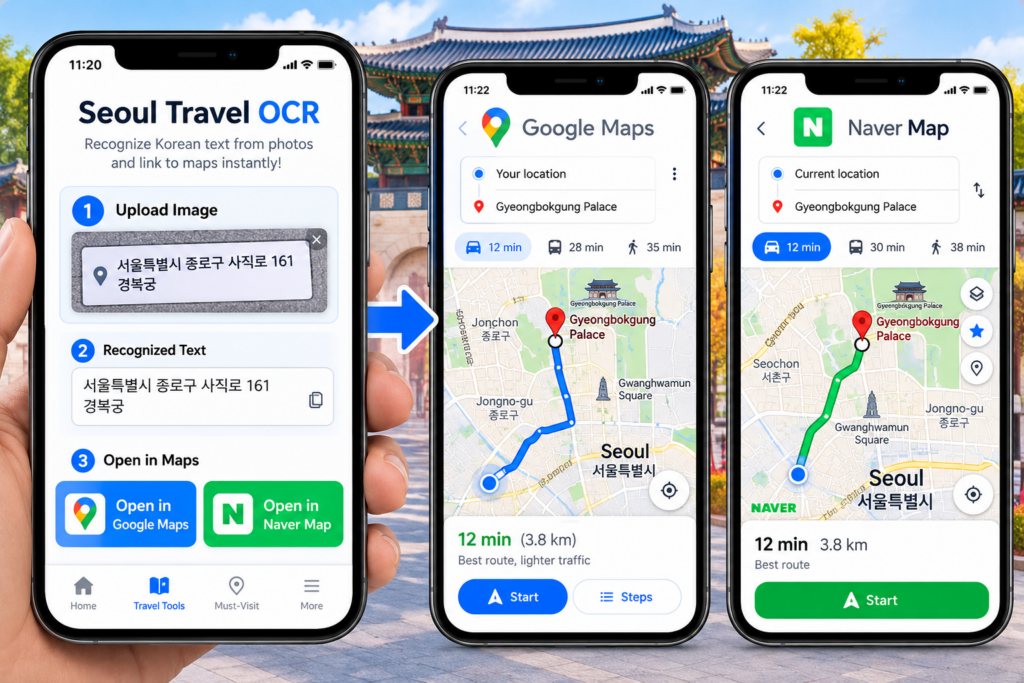
After uploading the address image, tap “Google Maps” or “Naver Map” at the bottom.
Your route will be displayed automatically. Follow the directions to reach your destination.
Use Case 2 – Finding Nearby Restaurants
If you’re looking for a nearby restaurant that serves the food you want to eat, Seoul Travel OCR can help you find it on the map.
Step1> Step 1 – Capture the Food Name
Search for the name of the food you want to eat and take a screenshot of the food name.

Step 2 – Upload the Image
Upload the screenshot of the food name to Seoul Travel OCR.
Step 3 – Find Nearby Restaurants
Next, tap “Naver Map” or “Google Maps” to find nearby restaurants.
We recommend using Naver Map to search for nearby restaurants, check ratings and reviews, and choose a restaurant you would like to visit.

Seoul Travel OCR Guide
Traveling in Seoul is exciting, but visitors can sometimes face a simple problem: the place they want to visit is written only in Korean.
You may find a restaurant on a Korean website, see a Korean address in a blog post, receive a Korean address from a friend, or take a screenshot of a place name from a map or social media. If you cannot read Korean, entering that information into a map application can be difficult.
Seoul Travel OCR Guide was created to make this situation easier.
With this mobile-friendly tool, you can capture Korean text from your phone, upload the image, recognize the Korean place or address, and then use the recognized information to search for the location on a map.
It is designed for a very practical situation:
“I found a place I want to visit, but the name or address is written in Korean. How can I get there?”
Instead of typing unfamiliar Korean characters manually, you can use an image of the information you already have.
What Is Seoul Travel OCR?
OCR stands for Optical Character Recognition.
In simple terms, OCR technology reads text contained in an image and converts it into recognizable text.
Seoul Travel OCR uses this concept for a travel situation. If you have a screenshot containing a Korean restaurant name, attraction name, street address, or other useful location information, you can upload the image and let the tool recognize the Korean text.
This can be especially useful for international visitors who may not be able to type Korean on their smartphones.
For example, imagine that you are searching for Korean food online and find a restaurant called 삼겹살. You take a screenshot of the Korean name.
You can then use Seoul Travel OCR to recognize the text.
The recognized result can be used to search for nearby restaurants or locations through a map service.
This makes OCR more than a text-recognition feature. It becomes a practical connection between information you find online and the place you want to visit in Seoul.
When Can You Use Seoul Travel OCR?
There are many situations where the tool can be useful during a Seoul trip.
1. You Find a Korean Restaurant Online
Suppose you are browsing Korean websites, blogs, social media, or travel information and discover a restaurant you want to visit.
The restaurant name may be displayed only in Korean.
Instead of trying to type the Korean characters manually, simply capture the restaurant name on your phone.
Upload the screenshot to Seoul Travel OCR and use the recognized Korean text to search for the restaurant on a map.
For example:
삼겹살 → Korean BBQ restaurants
This can help you discover restaurants related to the food you are looking for.
2. You Have a Korean Address
A Korean address can be difficult to enter manually if you do not read Korean.
You may receive an address through a message, see it on a Korean website, or find it in a screenshot.
Take a screenshot of the address and upload it to the OCR tool.
The recognized Korean address can then be used for a map search.
This is particularly useful when you need to navigate to a hotel, restaurant, shop, clinic, meeting location, or other destination.
3. You Find a Place on Social Media
Many travelers discover Seoul restaurants, cafés, shopping areas, pop-up stores, and attractions through social media.
Sometimes the information in the post is written in Korean.
Instead of manually copying unfamiliar Korean text, you can capture the relevant part of the screen and upload the image.
The OCR tool can help you extract the Korean location information from the screenshot.
This is a convenient way to turn information discovered on social media into something you can use while traveling.
4. You See a Korean Sign
You may also encounter Korean text while walking around Seoul.
For example, you might see the name of a restaurant, shop, market, or building that looks interesting.
If you can capture the information clearly in an image, you can use the OCR tool to recognize the Korean text later.
This is particularly useful when you want to search for a place after leaving the area.
How to Use Seoul Travel OCR
The basic process is simple.
Step 1. Find the Korean Information
First, find the place name, restaurant name, address, or other Korean location information you want to search.
You can find it on:
- A Korean website
- A travel blog
- Social media
- A screenshot
- A message
- An online map
- A photograph
- A Korean sign
Step 2. Capture the Information
Take a screenshot or photograph containing the Korean text.
Try to capture the text clearly.
For the best recognition result, avoid images that are extremely blurry, dark, tilted, or covered by other objects.
If possible, crop the image so that the important Korean text is easy to see.
Step 3. Upload the Image
Open the Seoul Travel OCR Guide on your smartphone.
Upload the screenshot or photograph containing the Korean text.
The OCR system will analyze the image and attempt to recognize the Korean characters.
Step 4. Check the Recognized Text
After recognition, check the result.
OCR is a computer vision technology, so recognition can sometimes be affected by image quality, unusual fonts, handwriting, reflections, or complicated backgrounds.
For important addresses, it is always a good idea to compare the recognized text with the original image.
Step 5. Search the Location
Once you have the Korean place name or address, use it to search for the destination on a map.
Seoul Travel Tips can help connect the recognized information with map-based searches, making it easier to move from Korean text → location search → navigation.
A Practical Example: Finding Samgyeopsal Restaurants
Imagine that you are staying in Seoul and want to eat Korean BBQ.
You search online and find the Korean word:
삼겹살
You do not know how to type Korean, but you can easily take a screenshot of the word.
Upload the image to Seoul Travel OCR.
The tool recognizes:
삼겹살
You can then use this Korean keyword for a map search.
Instead of manually trying to find the correct Korean spelling, the image becomes the starting point for your location search.
This is one of the practical advantages of combining OCR with map search.
The tool does not simply translate a word. It helps you use information you have already found.
Why Is This Useful for International Travelers?
Many travel websites provide information in English, but visitors can still encounter Korean-only information during their trip.
For example, a restaurant may have a Korean sign even if its menu is available in English.
A local blog may provide a Korean address.
A popular café may be easier to find using its Korean name.
A small shop may not have a widely used English name.
A destination shared by a Korean friend may only contain Korean text.
In these situations, the ability to capture and recognize Korean text can reduce the amount of typing required.
You do not need to know how to type Korean before using the information.
You simply start with something you already have:
an image.
Seoul Travel OCR Is Designed for Real Travel Situations
The purpose of Seoul Travel OCR is not to replace professional translation services.
Its purpose is much simpler.
It is a travel utility designed to help visitors use Korean location information more easily.
The most useful scenario is often not translating a long Korean document.
It is something much smaller:
“What does this Korean place name say, and how can I find it on a map?”
That is why the tool focuses on practical travel information such as place names, restaurant names, addresses, and searchable location information.
Tips for Better OCR Results
For better recognition, follow a few simple tips.
Use a clear image.
Blurry photographs can make character recognition more difficult.
Capture the important text.
If possible, crop the image so the Korean place name or address is easy to identify.
Avoid excessive background.
A simple image containing clear text generally makes recognition easier.
Check the result.
Always compare the recognized text with the original image when the information is important.
Use the Korean result for map searches.
Korean place names can sometimes produce more useful local search results than an approximate English spelling.
From Screenshot to Destination
One of the most useful ideas behind Seoul Travel OCR is the simple travel workflow:
Find → Capture → Upload → Recognize → Search → Navigate
You may discover a restaurant while browsing online in your hotel room.
You capture the Korean name.
You upload the image.
The OCR tool recognizes the Korean text.
You search for the location on a map.
Then you can follow the map to the destination.
This workflow can be especially convenient when traveling in Seoul because you may encounter Korean names everywhere—from restaurants and cafés to markets, shops, attractions, and local businesses.
Use Seoul Travel OCR Together With Other Seoul Travel Tools
Seoul Travel OCR is also part of the wider Seoul Travel Tips travel-tool concept.
Depending on what you need during your trip, you can combine OCR with other useful tools and map connections.
For example, you might use OCR to recognize a Korean address, a subway tool to identify the appropriate station and route, and a map service to navigate from the station to the final destination.
This creates a simple travel workflow:
Korean information → OCR → Map → Transportation → Destination
The goal is to make useful Korean travel information easier to use even when you cannot read Korean.
Important Note About OCR
OCR recognition is not perfect.
The result can vary depending on the quality of the image, font, lighting, resolution, background, and the amount of text included in the image.
For this reason, Seoul Travel OCR should be used as a travel assistance tool, not as an official source for critical information.
When using an address, reservation information, business name, or other important details, compare the OCR result with the original information before traveling.
Try Seoul Travel OCR
If you are visiting Seoul and encounter Korean text that you cannot type or read, you do not necessarily need to give up on finding the location.
Take a screenshot or photograph.
Upload it.
Let Seoul Travel OCR recognize the Korean text.
Then use the result to search for the destination on a map.
Seoul Travel OCR Guide is designed to help turn Korean text you discover during your trip into useful location information.
Whether you are looking for a Korean BBQ restaurant, a café, a shopping destination, a hotel, a local attraction, or a Korean address, starting with a simple screenshot can make the process much easier.
Find Korean information. Capture it. Upload it. Recognize it. Find your destination.